How to Choose an AI Model in Chat: 6 Options, Two Tiers
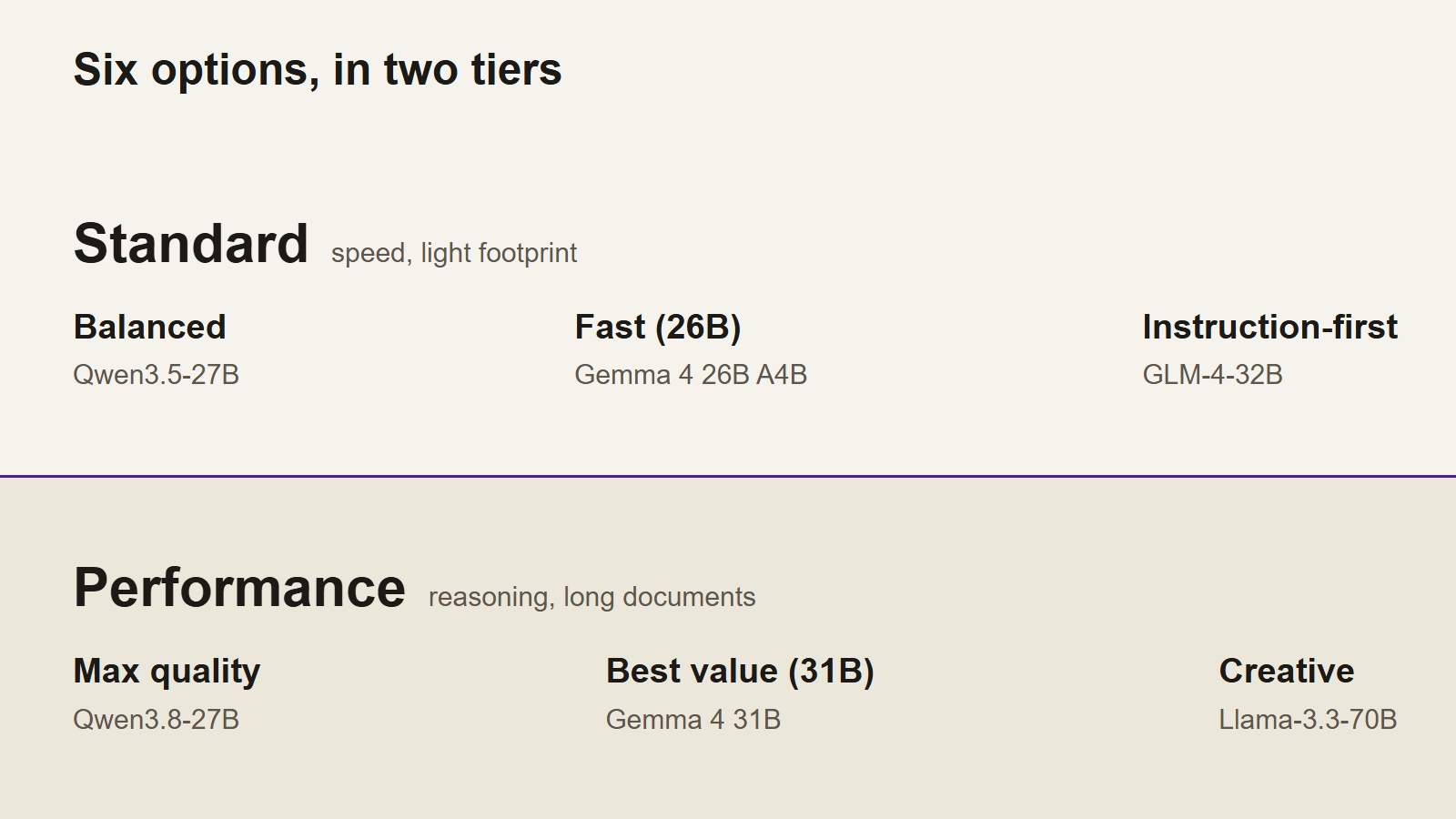
Six chat models across two tiers: Standard favors speed and Performance favors reasoning. See when to use each, how to switch, and why images bypass your pick.
Key points
- Leave the default in place if you are unsure: Balanced on Standard, Max quality on Performance.
- Start with the two tiers, then match the task to one of the three models inside the tier.
- Attaching an image switches to a dedicated image-capable model, so the model you selected does not apply.
Editor's note
We checked the primary sources linked in this note and organized only what they support. Unless stated otherwise, we did not run independent measurements.
Editorial policy and how we use AI →Contents
- Which AI model should you choose?
- What is the difference between Standard and Performance?
- Which models are in the Standard tier?
- Which models are in the Performance tier?
- Which model should you use for each task?
- What do the real model names mean?
- How do you switch models without losing the conversation?
- Frequently asked questions
You do not have to choose carefully. The picker opens on Balanced for the Standard tier and Max quality for the Performance tier, and both are sensible defaults. Change the model when an answer disappoints you: too thin, too slow, or wrong about the format. There are six options in total, three in each tier.
This guide takes the question in the order you meet it. First the two tiers, then the three models inside each, then the task-by-task picks and the real model names printed next to the labels. Every option is used the same way, so what changes is the answer you get back. Prices and credit amounts are on the pricing page.
Two rules cover most of it. Standard models answer quickly and suit summaries, rewrites, and short lookups. Performance models take longer and suit code, calculations, and long documents. Images are the exception: attach one and the request goes to a dedicated image-capable model, so the model you selected no longer applies.
Which AI model should you choose?#
Start with the default. Standard opens on Balanced and Performance opens on Max quality, and neither needs changing for ordinary questions. When a reply misses, move within the tier first: faster, stricter, or a different family. Move between tiers when the kind of work changes, such as a summary turning into code.
The picker shows the tier your plan or credits put you in, not all six names at once. That is why the tier matters more than the individual model at first: it decides whether the answer arrives quickly or arrives after working through the question.
What is the difference between Standard and Performance?#
Standard is built for speed and a light footprint. Performance is built for reasoning and long documents. Ask the same question on both and the content changes thickness: Standard returns the gist quickly, while Performance works through conditions and follows a chain of reasoning. The tiers also use different credit types, which the pricing page sets out.
The split is two layers, not six parallel choices. Within each tier the three models share the tier's bias and divide the work by task. Standard models all favor a short wait; Performance models all favor depth. Once the layer is settled, the remaining question is which of three jobs you are doing.
A plan maps to one tier, so the picker usually holds three names rather than six. Checking the tier first stops you looking for a model your credits cannot run.
Which models are in the Standard tier?#
Three: Balanced, Fast (26B) and Instruction-first. Balanced is the tier default and the general-purpose choice. Fast (26B) is for quick questions and summaries. Instruction-first holds formats and steps, so it suits requests that specify headings, bullets or an output order. All three put a short wait ahead of depth.
Balanced (Qwen3.5-27B). The default on the Standard tier. Pick it when you want neither speed nor quality to swing far in either direction. It handles ordinary questions, first drafts, and reading a document for the main point without much setup.
Fast (26B) (Gemma 4 26B A4B). The real model is Gemma 4 26B A4B, a mixture-of-experts model with about 3.8B parameters active at a time, so it answers without a long wait. Use it for light questions and summaries. It is less suited to a request that has to hold several constraints at once.
Instruction-first (GLM-4-32B). Choose it when the shape of the output matters: a set number of headings, a fixed bullet format, a required order. It is tuned for instruction following, the degree to which written conditions are obeyed. Prompts with checklists and format rules are where the difference shows.
Which models are in the Performance tier?#
Three: Max quality, Best value (31B) and Creative. Max quality is the tier default and favors reasoning and coding. Best value (31B) runs a dense Gemma 4 31B and keeps reasoning strong. Creative is a 70B Llama for long-form and creative writing, with reasoning that is weaker than Qwen or Gemma.
Max quality (Qwen3.8-27B). The default on the Performance tier. It is the option for questions with several conditions, for calculations in the middle of an argument, and for long documents where the answer has to point back to evidence. Answers take longer than on Standard.
Best value (31B) (Gemma 4 31B). The label points at value, and the model underneath is Gemma 4 31B, a dense model that runs every parameter on every token. It comes from a different family than Qwen, so the same prompt produces a different style of answer. Pick it when you want a second reading of the same question.
Creative (Llama-3.3-70B). Built for long-form writing and fiction: it keeps a thread across a long draft where a shorter answer would lose the plot. Reasoning is weaker than Qwen or Gemma, so it is a poor fit for fact-checking or arithmetic. Use it for novels, scripts and extended prose.
Which model should you use for each task?#
Match the task, not the label. Summaries and first-pass research go to Balanced or Fast. Code, arithmetic and evidence-heavy reading go to Max quality. Format-heavy prompts go to Instruction-first. Fiction and long drafts go to Creative. A task with an image attached leaves the model choice behind entirely.
- Summaries and quick lookups: Balanced or Fast. If you only need the main points of a long document, Fast is enough.
- Code, calculations and documents you have to cite: Max quality.
- Fixed headings, bullet shapes or output order: Instruction-first.
- Novels, scripts and long drafts: Creative.
- Images: the model selection does not apply. Attaching an image switches the request to a dedicated image-capable model, so the selected model is not the one that reads the picture.
- Long English prose that has to keep one voice: start with Creative. For a factual English brief, test Balanced against Max quality and keep the answer that needs fewer corrections.
When a choice still feels close, return to Balanced. If Performance felt like too much, move back to Standard; if Standard felt thin, move up. The round trip is faster than reading six descriptions, because your own question is the test.
What do the real model names mean?#
The display name describes the job; the real model name identifies the weights. Both appear in the picker because the label alone hides the family. The first part of the real name is the family: Qwen is Alibaba, Gemma is Google, GLM is Zhipu AI and Llama is Meta. Families differ in strengths even inside one tier.
The number at the end is a rough parameter count, a measure of how much the model holds. Bigger usually means heavier. A mixture-of-experts model is the exception: it keeps every expert in memory but runs only a subset on each token, so it computes like a much smaller model even though it still needs memory for the full count.
All six options have been modified to remove refusals. The method is explained in abliteration. How makers' own low-guardrail models differ from these builds is covered in low guardrail models, and uncensored models lists options for running one yourself.
How do you switch models without losing the conversation?#
Switch whenever a reply disappoints, including mid-conversation; the next message uses the new model and the earlier turns stay in context. Keep the question identical when you compare two models, or the difference you see may come from the prompt rather than the model. Change one variable at a time.
- Run the same question on two models. The difference in reply is easier to judge than any description.
- Move up a tier when the answer is thin. Adding another condition to a weak model often takes longer than switching.
- Move back down when the wait bothers you. On a day of short questions, Standard is enough.
- Change the model, not the prompt, on the first retry. Rewriting both leaves you unsure which one helped.
The same option can be right for one document and wrong for the next, so switching is a normal part of use rather than a setting to get right once.
Frequently asked questions#
Which model should I choose?#
Leave the default in place: Balanced on the Standard tier, Max quality on the Performance tier. Both handle ordinary questions without tuning. Switch when a reply feels thin, slow or off-format, and change one thing at a time so you can tell what made the difference.
Does switching models change the price?#
The tier decides the credit type rather than the individual model: Standard options spend Standard credits and Performance options spend Performance credits. Amounts and what each plan includes are on the pricing page. Check that page before a long session, since plans and allowances change over time.
Does the model I pick matter when I send an image?#
No. Attaching an image switches the request to a dedicated image-capable model, whatever is selected in the picker. The selection applies to text messages only. Choose the model for the text work, and let the service handle the picture; there is no image model to pick.
What is the difference between the display name and the real model name?#
The display name describes what the option is for, while the real model name identifies the weights behind it. The real name shows the family — Qwen, Gemma, GLM or Llama — and the parameter count. Once the tier is settled, the family is the better signal of how an answer will read.
Try it yourself
Deepent Research is an LLM chat service that refuses almost nothing. Everything covered in this note can be tried without downloading anything.
This note is provided for educational and research purposes. It does not encourage illegal activity.
How this note was edited and verified
Our editors check primary sources and organize only what the facts support. What we checked, and what we did not, is listed in the editor's note on each article.
Related notes
Uncensored LLMs: 10 Best Models by GPU Memory (2026)
In 2026, the best uncensored LLM for most people is Qwen3.8-27B abliterated. 10 top picks by GPU memory, plus how uncensored and abliterated models differ.
What Is Abliteration? How LLMs Lose Their Refusals
Abliteration is a weight-editing technique that removes an LLM's refusal habit while keeping its knowledge intact. Learn how it works, in plain English.
Low Guardrail Models: Why Makers Ship Safety Separately
Low guardrail models from Meta, Google, Mistral and DeepSeek fall into three types. Learn how each type works and what to check before you choose one.